
Set counselling hours
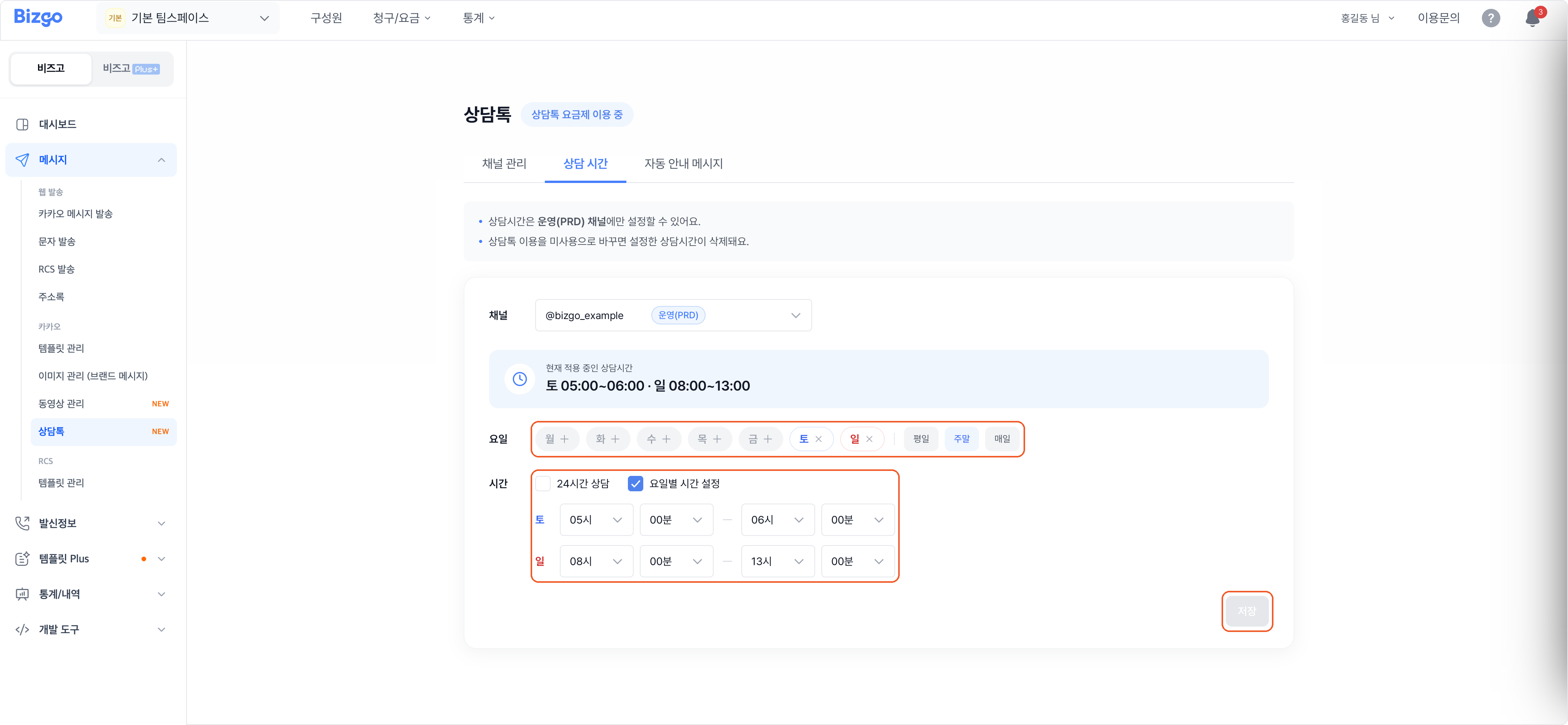
Under Bizgo > Messages > Kakao > Counsel Talk > Counselling hours, set the days and hours when customers can start a conversation.
Production (PRD) channels only
Counselling hours cannot be set on a development/test (CBT) channel.
1. Choose a channel
Choose the production channel you are setting hours for. The hours currently in effect are shown above.
2. Choose the days
Pick days one by one, or use Weekdays, Weekend, or Every day to select them in one go.
3. Set the hours and save
Choose 24-hour counselling or Set hours per day, set the times, and click Save. Once saved, the hours appear immediately under Counselling hours in effect.
Turning Counsel Talk off deletes the hours
If you switch Use Counsel Talk off in the channel settings, the counselling hours you set are deleted. → Register a Counsel Talk channel