
Check your plan
Choose a Team space and click Search to see the plan in use, the monthly base fee, the monthly included volume, and the available services. View details under the plan shows the per-message charge by message type.
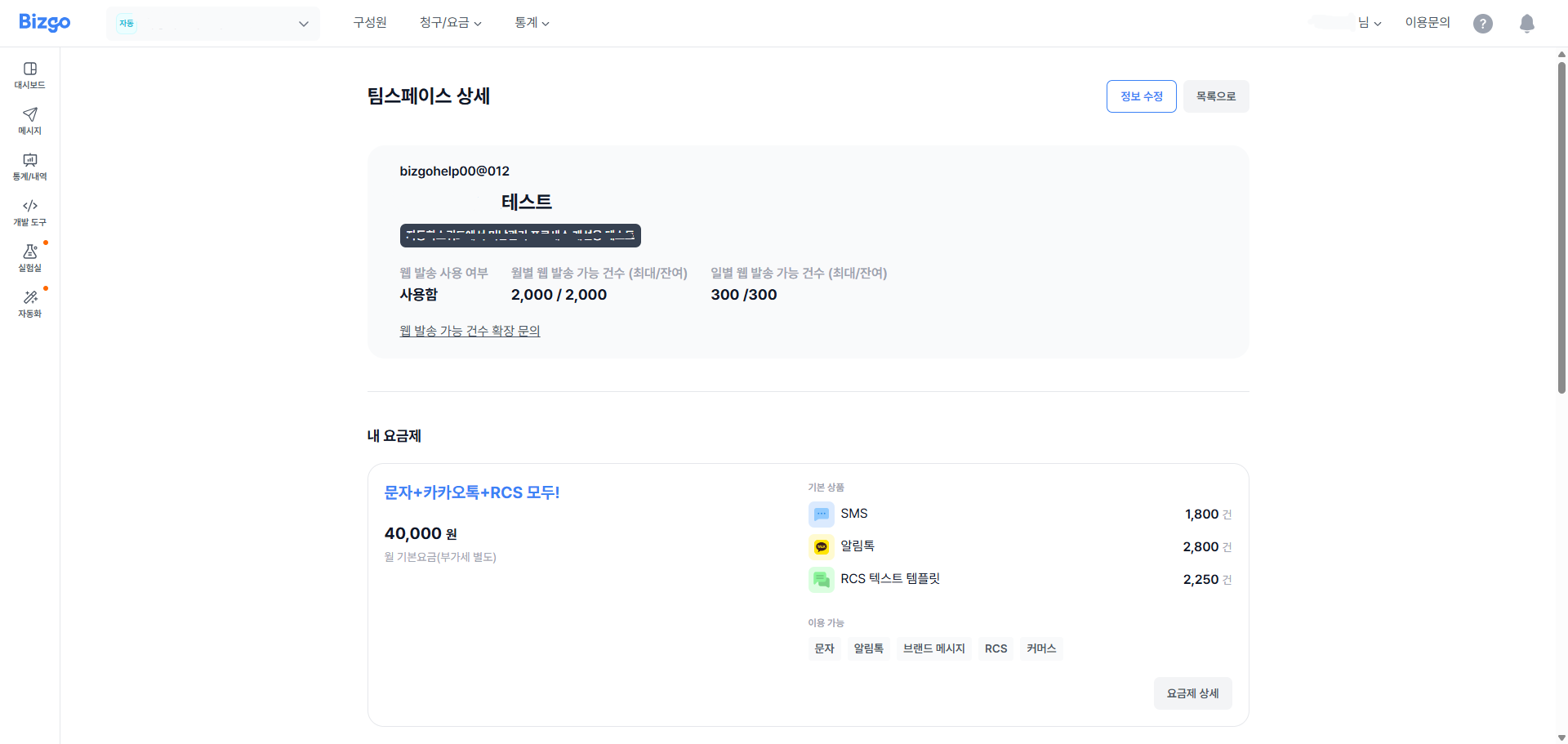
How charges work
- A monthly plan has a base fee each month, and usage above the plan adds charges.
- Charges are based on usage from the 1st to the last day of each month.
- Unused monthly volume does not carry over to the next month.
- The base fee is prorated in the month you sign up or close the account.
- The base fee and per-message charges shown are exclusive of VAT.
The included volume applies only to the listed message types
Sending a message type that is not listed on the plan incurs a separate charge. Brand Message is priced differently depending on the audience (friends versus non-friends), so check that too.
Plans cannot be changed in the console
To change a plan, use Service inquiry at the top of the console and tell us the team space and the plan you want. We will change it after review.
CS Talk plan
A CS Talk plan can be chosen separately from the communication product plan. Choosing it issues an Omni key for CS Talk.
- It can be held alongside a communication product plan. You do not have to cancel your existing plan.
- Charges are based on the number of channels and chat rooms; adding a channel adds the per-channel fee.
- Unit prices differ by contract. Contact the Bizgo sales team for exact figures.
Next
- Billing records → Check billing records