
2026.09Update
Kakao Brand Message 'Catalog' is now open
A catalog template lets you put 3 to 7 product or content items into a single Brand Message as a list.
26.09.29 Kakao Brand Message 'Catalog' is now open
In one line
A catalog template lets you put 3 to 7 product or content items into a single Brand Message as a list.
What it does
The 'Catalog' Brand Message template lets you compose 3 to 7 product or content items as a list and send them together.
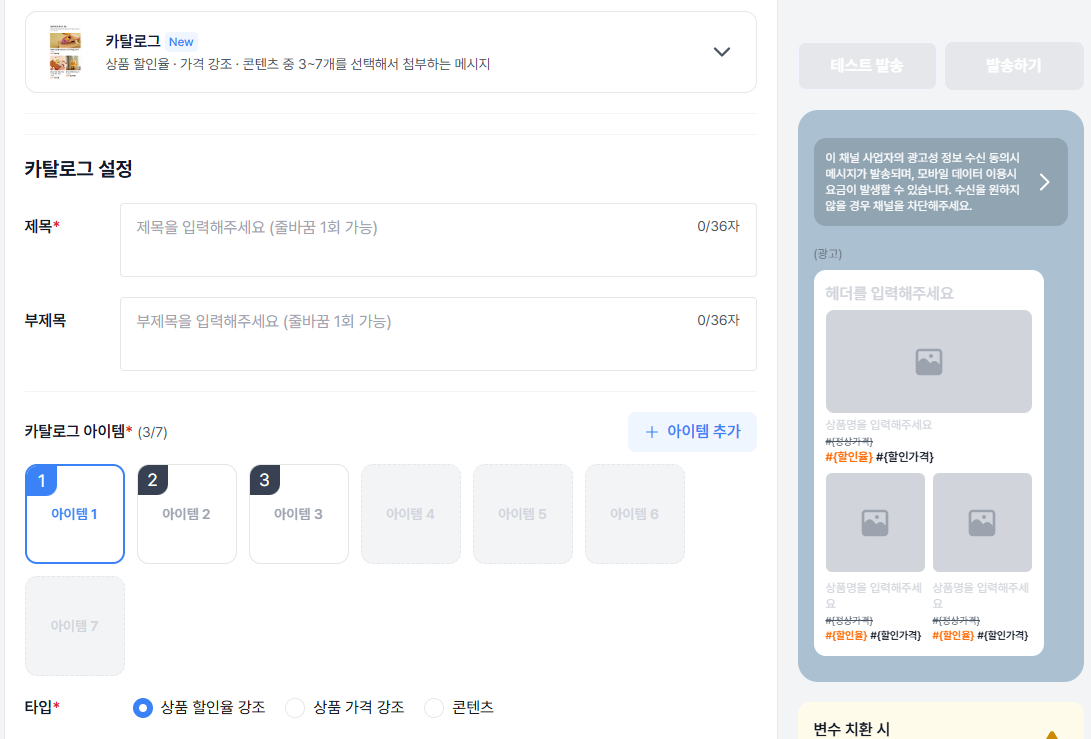
- Show several items (3 to 7) as a list in one message, so you introduce products together instead of splitting them across sends.
- Pick the presentation that fits each item.
- Highlight the discount rate — shows the discount rate large, for sales and special offers.
- Highlight the price — shows the list price and the sale price together with the price label, for comparison.
- Content — introduces items through the image, title, and description, with no price.
Where it fits
- New or best-seller collections — introduce several products in a single message.
- Seasonal and themed sales — use the discount-rate type to make the offer stand out.
- Line-ups by price band — use the price type to compare the list price against the sale price.
- Content and news curation — use the content type to deliver several items as a list with no price.
Things to note
- You can pick at least 3 and at most 7 items. Items 1 to 3 are required and items 4 to 7 are optional.
- The title holds up to 36 characters and the promotional line up to 36 characters with one line break. Links cannot be entered.
- Item images are 800×800 (1:1), JPG, JPEG, or PNG, up to 5MB. When the item count is odd, 800×400 (2:1) is recommended for the first item.
If you integrate through the API
Catalog messages are sent with msgType FG. You can find the specification in the Kakao Brand Message API reference.
- The
attachment.catalog.list[]item fields andcatalogVariable[]for sending and template registration headerDescription(FG only, up to 36 characters)- Two catalog item image upload APIs —
catalog(1:1) andcatalog/oddFirst(2:1)