
RCS web send and template management
RCS web send (review-free SMS/LMS) and template management for pre-registering RCS message are now open. Try RCS web send in Bizgo without any system integration
[ 25.08.13 ] RCS web send and template management
RCS web send and template management are open
RCS web send (review-free SMS/LMS) and template management for pre-registering RCS message are now open. Try RCS web send in Bizgo without any system integration
Overview
With iPhone expected to start receiving RCS (Rich Communication Services) messages in the second half of 2025, Bizgo moved quickly to prepare RCS web send.
What is RCS?
Short for 'Rich Communication Services', it is the next-generation messaging service that replaces SMS/MMS, carrying read receipts, high-resolution media, and other rich content.
See the RBC site for details.
Reference link: Go to the external docs
Key updates
- RCS template management
- Register RCS SMS and LMS messages in advance.
- Send an RCS message straight from a registered template
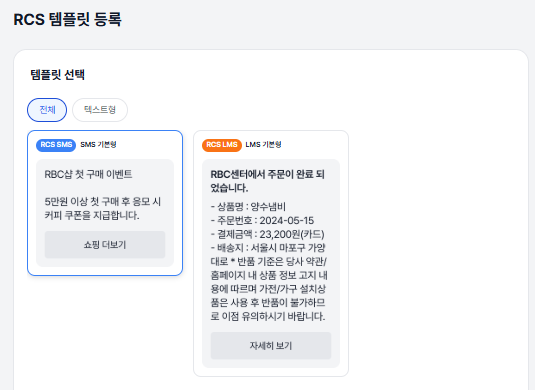
- RCS web send
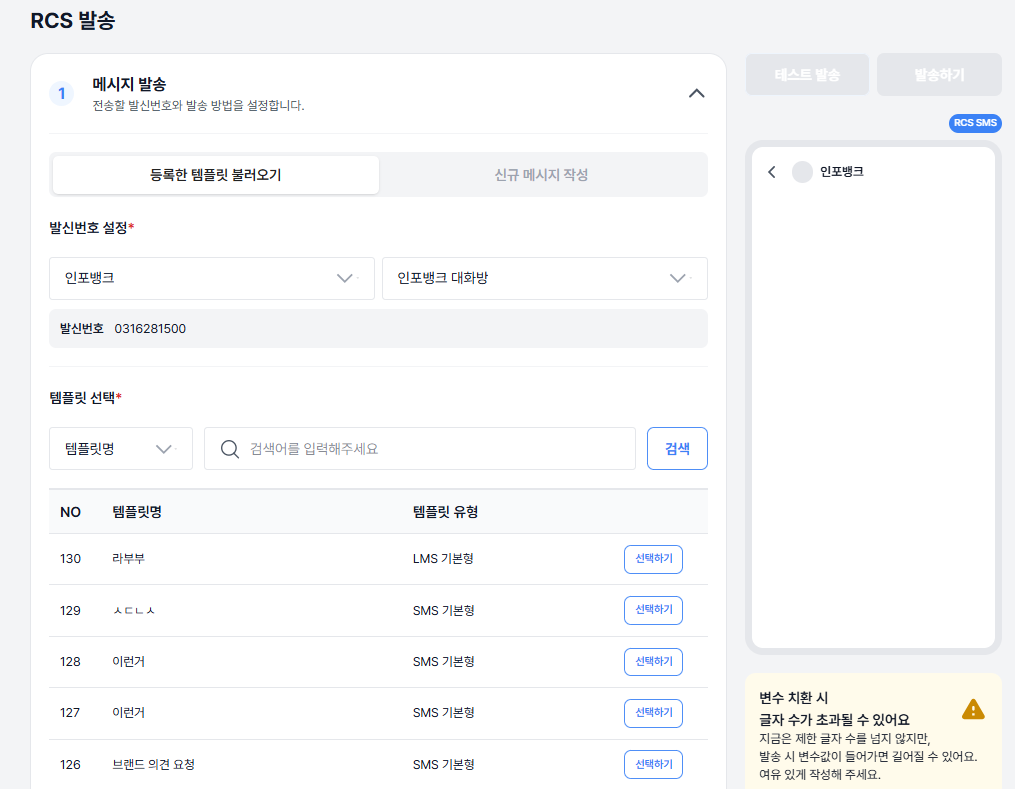
- Choose how you want to send (load a template or write a new message), and send from the sender number of a registered brand.
- You can also set failover content so the message goes out as an SMS/LMS/MMS message if RCS delivery fails.
- When you use variables, manage recipient data such as per-recipient variable values.
- Use a test send to check variable substitution, line breaks, links, and character counts on a real handset.
How to use it
1. Create a brand
- About creating a brand
- To send RCS message, sign up at RCS Biz Center (https://www.rcsbizcenter.com/) and create a brand and a chatroom.
- After you register the brand and create the chatroom, leave a post on the Infobank inquiry board and a representative will contact you.
2. Register a template
- Register an RCS template to save the messages you send often and change only the variables.
- Once registered, you can send the template immediately with no separate review step.
3. Send RCS
- Load a template or write a new message.
- Use failover to extend the message channel to SMS/LMS/MMS for users who cannot receive RCS.
- If you used variables, you can edit each user's values before sending.
What you get
⚙️ For operations: better system efficiency and stability
- Send logic is standardized on a shared send module.
- An SDK-based design strengthens failure resilience and service scalability.
- The send flow is laid out clearly step by step, so both operators and developers manage it more efficiently.
💡 For customers: a better user experience and business impact
- The flow from registering a message to sending it is simpler and more intuitive.
- Visual expressiveness and interactive elements (buttons, links) in brand messages
raise your message quality and brand trust. - Click-oriented layouts can lift customer engagement and campaign conversion.
Notes
- You can use this after creating a brand and chatroom in RBC.
- Before a real send, run a test send to check the linked URLs and the length of substituted variables.