
2025.12Update
Review-pass templates
Load a template that has already cleared review and send it immediately.
[ 25.12.04 ] Review-pass templates
Summary
Load a template that has already cleared review and send it immediately.
At a glance
- Key feature: use review-pass templates right away
- Applies to: anyone who sends Alimtalk from the web or uses templates often
- Where to start
- Template management > Review-pass templates
- Web send > Kakao message > Load template > Review-pass templates
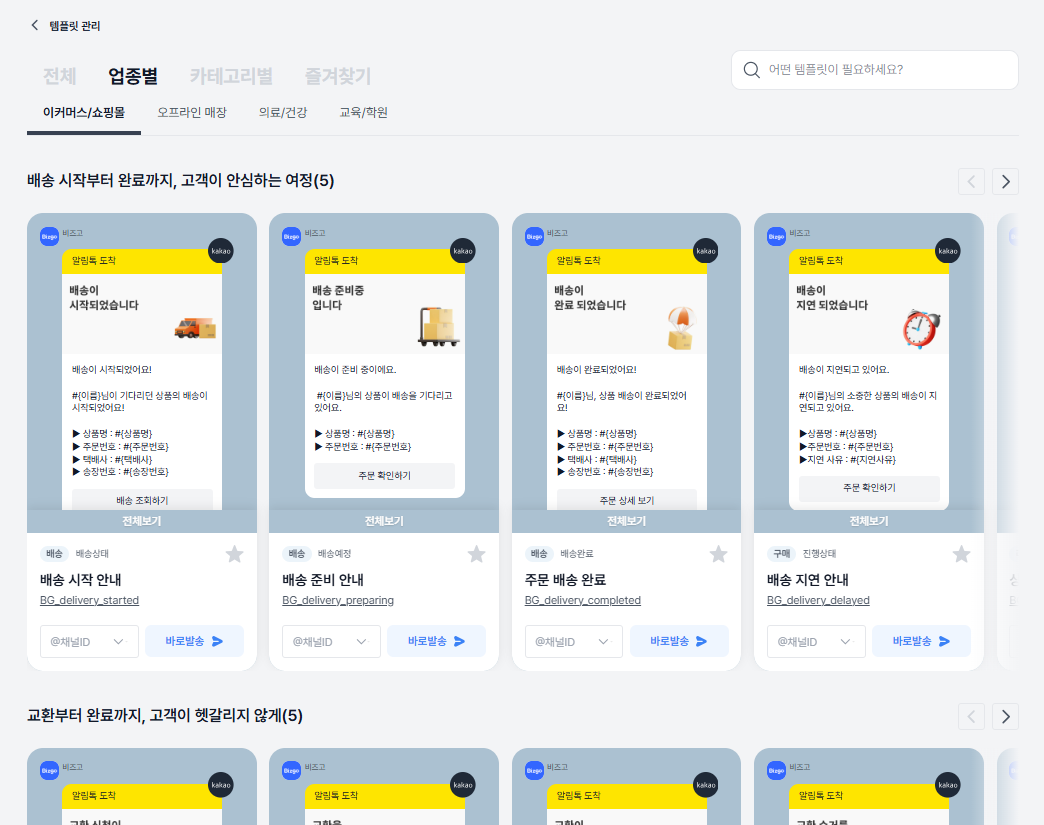
What changed?
- About 56 public templates provided by Kakao
- About 97 group templates provided by Bizgo
→ 153 templates in total, usable with no review - Send immediately, with no separate approval step
- Templates are pre-arranged by industry and purpose, which cuts initial setup time considerably
Why it matters
- Sending with no wait for review speeds up operations considerably.
- Standard templates that even new users can pick up immediately make for a fast first send.
How to use it
- Choose the 'Review-pass templates' menu in Template management
- Browse the templates by industry and type
- Pick the template you want and go straight to send setup
Things to note
- Review-pass templates cannot be edited, but you can send them with variables.
- If you need changes, register a new template and use it after it passes review.